
The Sonder Flu Vaccination Program makes it simple for organisations to provide flu vaccinations to their people. Sonder can connect you with our preferred provider Aus Vacs, one of Australia’s largest vaccination providers, to offer onsite or voucher-based vaccination programs.
Customers with an existing flu vaccination provider can still benefit from Sonder by promoting their program directly through the app. Sonder will display the organisation’s booking link (ideally open access, without password restrictions) and support the launch with in-app promotion.
Program Overview
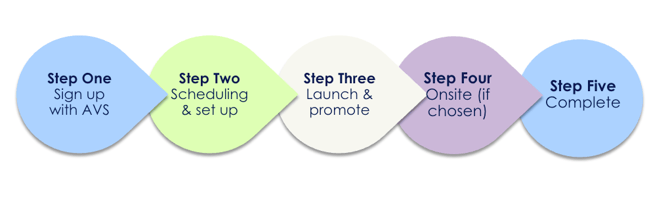
Step One: For new programs, sign up with Aus Vacs
Register your organisation's interest with Aus Vacs through their partner registration form. During sign-up, you'll confirm:
- Preferred program type: onsite clinics, pharmacy vouchers, or both
- Number of expected participants
- Clinic locations (if onsite)
- Target vaccination dates
If you already use a vaccination provider (internal clinic, pharmacy network, or other vendor), you can still use Sonder to promote it. Skip to "Step 3: Launch and promote."
Step 2: Scheduling & set up
Aus Vacs will work with you to finalise clinic dates, times and voucher options. They’ll create a custom online booking system for your employees, which you can provide to Sonder to integrate directly into the app. This setup makes it easy for members to find and book their vaccination in just a few taps.
Aus Vacs will also the confirm the cost of the specific program based on the different program and quantity of vaccinations your organisation wishes to provide.
Step 3: Launch & promote
Fill out the Sonder flu vaccination program form with:
- Your booking link (Aus Vacs or your provider)
- Program dates and details
- Any organisation-specific messaging
Sonder will activate the Flu Vaccination tile in your app and configure push notifications.
You’ll receive ready-to-use promotional materials such as posters, guides, social tiles and email templates. These resources make it simple to spread awareness across your workplace.
4: Onsite support
On clinic days, Aus Vacs’ immunisation nurses manage setup, vaccinations and post-care monitoring. Each nurse is trained to deliver efficient, high-quality service and ensure the wellbeing of participants. For voucher programs, Aus Vacs provides clear redemption and reporting support.
Frequently asked questions.
Can we mandate flu vaccination?
The program is optional, employees then choose whether to get vaccinated. However, you can strongly encourage it through communication and manager engagement.
Will we see individual employee vaccination records?
No. Your reporting shows aggregate numbers and uptake rates only. Individual employee health information remains confidential.
What if an employee has a side effect?
This is rare. Employees can contact Aus Vacs (1800 FLU VAC), contact a Sonder Nurse via the Sonder app, speak to their GP, or the Therapeutic Goods Administration (1300 134 237).
Can we integrate with our own provider?
Yes. Provide Sonder with your booking link and we'll promote it through the app. Fill out the form here.
What if we want to change clinic dates after launch?
Notify Sonder and your provider immediately. Updates to dates/times will be reflected in the app.