
For members
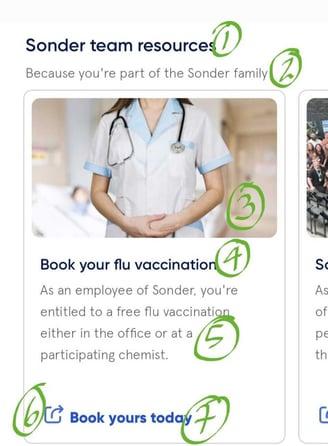
The resource hub appears at the bottom of the Sonder app home screen. It's a carousel of tiles that you can scroll through. Each tile links to something your organisation has chosen: maybe your benefits guide, a company policy, or an employee discount programme.
Just tap a tile to open the link. It will take you outside the app to the resource your organisation selected.
For customers
The resource hub lets you surface important information directly in the app without requiring updates or downloads. It's useful for:
- Company policies (code of conduct, dress code, health and safety)
- Employee benefits (discounts, wellbeing services, financial support)
- Third-party services (rewards programmes, financial planning tools)
- Important documents (employee handbook, intranet links)
You choose up to five items. Members see them on the app home screen and can click through to access them.
Setting up your resource hub
To create a resource hub item, you'll need to provide:
Item details (for the app):
- Title (up to 30 characters): What the tile shows
- Subtitle (up to 45 characters): Additional context
- Image (16:9 format, .jpg, .gif, or .png): Visual for the tile
- Link title (up to 25 characters): Label for the button
Link details (where the item takes members):
- URL: The web address members go to when they tap the tile
- Examples: PDFs on your website, benefits pages, external links (rewards programmes, financial services)
Important note: If your resources are hosted on an intranet or behind login, members may need to log in again on their device. For the best experience, link to publicly accessible resources or resources that don't require re-authentication.
Frequently asked questions.
Can members share the resource hub?
No. The resource hub is only visible in the app to members of your organisation.
What happens if a link breaks or changes?
The tile will still appear, but the link won't work. You can update the URL anytime through the Portal. Contact customer.support@sonder.io if you need to change an item.
Can members opt out of seeing the resource hub?
No. The resource hub is a standard feature of the home screen. All members see the same items.